
How to List Your Property on TriniApt.com
Listing Made Simple
Adding your property to TriniApt.com is quick, easy, and completely free. Whether it’s an apartment, house, land, or commercial space, your listing can be live in just minutes — reaching buyers and renters across Trinidad & Tobago.
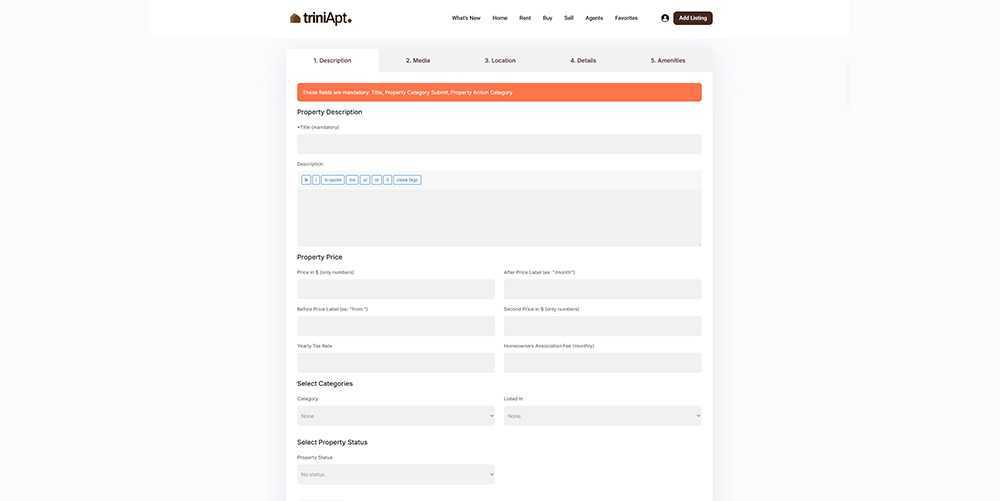
Step-by-Step Guide
1. Sign In or Register (Free)
Create your free account or sign in to an existing one. Registration only takes a moment and gives you access to your dashboard and property tools.
2. Click “Add Listing”
You’ll find the Add Listing button at the top of every page. Click it to open the property submission form.
3. Enter Your Property Details
Add your title, price, location, and property features. Upload images, write a clear description, and include all relevant details. When ready, Preview your listing or hit Submit.
4. Done — Property Listed! (Free)
That’s it! Your property is now published on TriniApt.com, visible to thousands of active home-seekers and investors.
Tip: No Account Yet? No Problem!
You can start a listing even without signing in. Once you’ve filled out the form, you’ll be prompted to sign in or register before completing your submission.
Manage Everything from Your Dashboard
When signed in, you can add, edit, or manage listings directly from your Dashboard. Update property info, track messages, or remove listings anytime — all from one place.
Your TriniApartment.com account is fully compatible here.
Simply use the same login and password to sign in.
FAQ
No — listing on TriniApt.com is completely free.
No, your listings stay active indefinitely unless you choose to remove them.
Yes. You can edit your listing anytime through your Dashboard once you’re signed in.
You can start filling out the form without signing in, but you’ll need to sign in or register before submitting.
There’s no limit — you can post as many properties as you like.